Webinar Replay + Bundle Offer
Today's Offer

What You Get
Meeting Buddy ($ 299.9)
Founder's Fast Track ($ 199)
Inner-Circle Priority Support ($ 499)





BONUS

Enterprise Security Secrets
This is what everybody should now, yet only 5% does. With this playbook, you'll be able to lock in like a PRO, without digree from IT.
Level Up Privacy
PC Anti-Theft Policy
Stay Private During Every Call
Secure Every Connection
Never Forget a Password Again
Lock Down Every Login

30-Day Money-Back Guarantee
You have nothing to lose. If you're not completely satisfied within the next 30 days, we'll refund your entire purchase.
Testimonials

As a freelancer, I rely on tools that are both effective and reliable. This app exceeded my expectations.
Kristian Strba
UI Developer

App has shown promise. It’s incredibly versatile and has become an indispensable part of my toolkit.
Max Zhylockin
CEO

This app has been a game-changer for my workflow. It's intuitive, powerful, and has all the features I need to stay organized and productive. Highly recommend!
Maria Vorcakova
Marketing Assistant



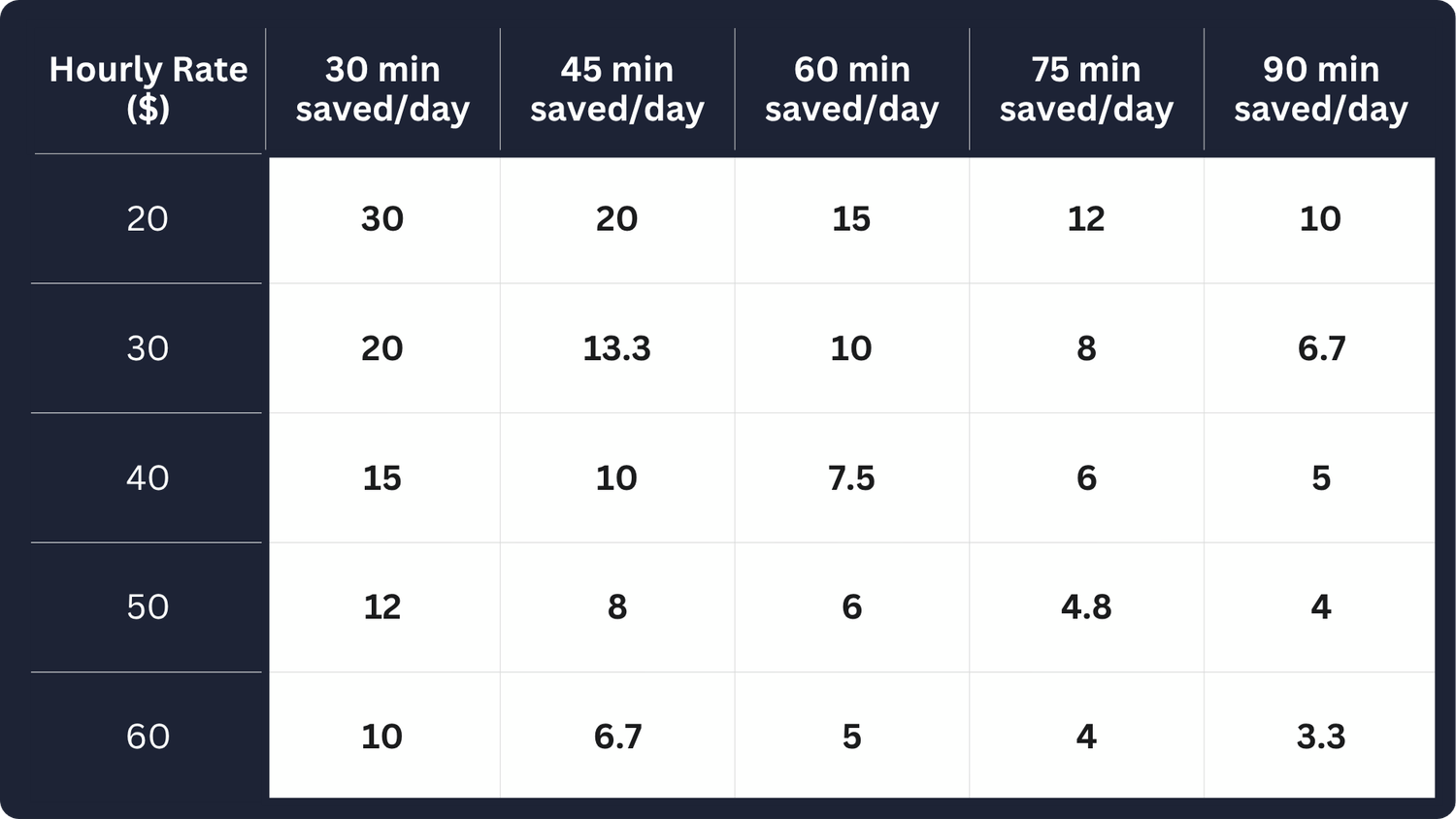
The "Is It Worth It?" Calculator
Find your hourly rate in the first column. Follow that row to the minutes you'll save each day. That number is how many days it will take to get your entire investment back.
Frequently Asked Questions
🎁 Today's BUNDLE OFFER
Example:
If you make $60 per hour and Meeting Buddy saves you between 30 and 90 minutes a day, then over the course of a year your savings will add up to between $7,000 and $21,000.
Pesimistic example:
Even if you make just $10 an hour and it saves you only 30 minutes a day, that still adds up to about $1,200 worth of time over a year.
Pretty cool, right?
It's the annual subscription for Meeting Buddy, tool which helps you get your time back. Comes with all 6 modules:
Auto Recorder
Silent Co-Pilot
Full-Report + Audio
Ask Assistant
Transparency
Total Privacy
This is 1 hour long Master Class course. Inside I'll walk you through the app. Show you how it works and how to set it up for you personal needs. It's designed to make you squeeze as much value from Meeting Buddy as possible.
Note:
If you'll miss anything just ping me inside Inner-Circle group and I'll add ASAP new video or guide you need.
It's my way of giving you the only channel I'm always online. It's a signal priority group, You'll receive the guide and the link to this group once you pay for the bundle in the first Welcome email.
Enterprise security secrets cover:
How to setup your Local AI to be compliant with HIPPA & FERPA
How to protect Your PC against theft
How to secure your communication agains surveilance
How to hide your Network activity
How to remove Password Headache once forever
How to make ti super hard for hackers
All of this in super simple form, so you're ready to go within 1 hour.
💬 Pricing & Plans
Yes, Your satisfaction is everything. If you'll find out within first 30 days that you don't like it, send us email and we'll refund you ASAP. This way it's zero risk for You.
Note:
Satisfaction guarantee does apply only if you buy this bundle for $ 299.90. Doesn't apply for monthly or any other offer.
The difference is only if you can manage or not other users. If you buy team plan you'll have ability to set access to your subscription, similar to Spotify Family plan.
Yes, subscription subscription does not influence the access to historical sessions.
Yes, more users you bring with you the better the deal. We support teams of Individuals or Business teams up to 40 people. But for this scenario please follow the main website pricing flow.
🔒 Privacy, Security & Compliance
All your data are stored within your computer. Recordings are transcribed in real time on your side + even post meeting analysis is done by the app calling LLM provider as client from your side. We don't even get to see your data.
It's similar as with incognito Browser. If you use encrypted messagers like Signal, then yes nobody get's to see your data. But we can only guarantee what happens within our software, recorded data won't leave your computer.
Yes — and here’s how:
✅ GDPR & CCPA: Your data stays 100% local on your device. Nothing is stored or logged by us. You control where analysis happens — either through your own OpenAI/Azure keys or even locally with Ollama. That means total privacy and full compliance.
⚠️ HIPAA & FERPA: Meeting Buddy can support HIPAA and FERPA-sensitive use only if you use your own secure deployment — like Azure with a BAA, or a local Ollama setup. We don’t store or process any data ourselves.
Bottom line: You stay in control — your data, your choice.
You can remove and update most parts of the Meeting Report except for transcript. You can export everything from Meeting Buddy.
🛠️ Setup, Tools & Integration
Yes, but the list doesn't stop here. Because it's can process any audio from speakers, files or YouTube it can process even discussions via Signal which is not supported by any existing cloud solution.
Yes, you have to install app eighter directly download it from our official website or via MS Store.
Meeting Buddy let's you easily export it's content as Txt, Mardown, Jira Markup, MS Word + you can export trimmed audio recording. We went this way so we're compatible with every tool not just google docs, slack or CRMs.
Yes, that's built-in feature. As people will talk to you Meeting Buddy will detect it and reminds you with notification to start recording with one-click.
🚀 Productivity & Use Cases
Yes, you can review all processed discussions, search within or even replay moments from recordings.
It gives you space to breathe, zoom out, and stay sharp.
While you're in the meeting, Meeting Buddy provides:
✅ Real-time summaries — stay focused without losing the thread
✅ Live transcripts — no more frantic note-taking
✅ Keyword spotting — get alerted when key topics or signals pop up
✅ Audio fingerprinting — get notified instantly when your name is mentioned
Stay present. Let Meeting Buddy handle the rest.
You can, but transcripts will be available from the moment you join. Meeting Buddy processes your audio. Simply put, Meeting Buddy hear only what you can hear.
Yes, Meeting Buddy will remind you to start recording once someone speaks to you. You can even setup which words will trigger this behavior. Notes are taken automatically.
🧠 Transcription & AI Accuracy
We're constantly updating the transcription models so you have the most accurate systems on the planet available.
Currently or Fluent models have less than 2% error rate in normal conversations.
To put you into the perspective humans have about 6% error rate.
Absolutelly, Meeting Buddy learns voice of each participant in real time. So it's improving it's accuracy on fly. If person is called by it's name during the meeting, AI Assistant will assign internally voice ID with this identity which will be then translated in analytics result.
Yes, we found out it works very well. But it's even better because within the APP you can define domain knowledge (words you use within the team), so even if word is not properly recognized AI Assistant will understand properly and give you right Post-Meeting Analytics.
Processing Time Estimates (Based on Transcript Length):
Up to 1 hour of transcript → under 1 minute
Up to 2 hours of transcript → under 2 minutes
Up to 3 hours of transcript → under 3 minutes
📊 Meeting Report & Collaboration
Yes, you can export all content from Meeting Buddy in supported formats. But if you're looking for specific integration feel free to request feature directly from the APP.
Data are only yours, so other users cannot edit data. But You can do what ever you need. Each part is fully editable.
Yes, every meeting has notes section. You can put there any additional information and later use it in search to find your meetings. But we're open to improve this flow based on your needs.
Meeting Buddy is fully private. No other users have access to your data unless you explicitly export content.